顯示具有 FLEX 標籤的文章。 顯示所有文章

2016年4月20日 星期三

Building Flex app using gradlefx(some issue record)

In Android development,now I used Android Studio for my IDE,so using gradle for building android must using gradle script.

In my another programing skill Flex,Most of programmers use ant for building script.Now I have a modern choice: gradlefx.

Below record is for what I encounter some issue:

1.Ambiguous method overloading for method java.io.File#. error

So I get starling sample code from starling website.In starling sample,they use gradefx for building process.So  when enter "gradle" command in the sample folder.

G:\starling-2.0\samples>gradle
Parallel execution is an incubating feature.
Defining custom 'build' task when using the standard Gradle lifecycle plugins ha
s been deprecated and is scheduled to be removed in Gradle 3.0

FAILURE: Build failed with an exception.

* What went wrong:
A problem occurred configuring project ':demo_mobile'.
> Ambiguous method overloading for method java.io.File#.
Cannot resolve which method to invoke for [null] due to overlapping prototypes b
etween:
        [class java.lang.String]
        [class java.net.URI]

* Try:
Run with --stacktrace option to get the stack trace. Run with --info or --debug
option to get more log output.

BUILD FAILED

Total time: 35.549 secs

This issue is cause of FLEX_HOME did not define.
When I define FLEX_HOME in system environment,the error won't happen again.

2012年8月14日 星期二

【Flex】Using resource bundles

We know in flex,we will define different property file in different locale folder,usually we can get string by key as below:

   1: hello=Hello


   2: you=You


   1: hello=你好


   2: you=你


In actionscript3 we will use resourceManager.getString('locale',’hello')  set to the value.


and in mxml we will use text="@Resource(key='hello', bundle='locale')" set to value


If we embed the assets in flash(fla),and wanna retrieive the asset by symbol,we will define our property as below:


   1: betarea=Embed(source="./assets/assets.swf", symbol="asset.MySymbol")


   1: betarea=Embed(source="./assets/assets.swf", symbol="asset.MySymbolTW")


In actionscript3 we will use resourceManager.getObject('locale',’betarea') set to the value


and in mxml we will use source="@Resource(key='betarea', bundle='locale')" set to the value


If we define a class by actionscript3 or mxml for customized component and customized skin,we will define our property as below:


   1: entertable=ClassReference("com.leon456.skin.EnterTableSkin")


   1: entertable=ClassReference("com.leon456.skin.EnterTableSkinTW")


In actionscript3 we will use resourceManager.getObject('locale',’betarea') set to the value


and in mxml we will use skinClass="@Resource(key='entertable', bundle='baccaratmoduleui')" set to the value

2012年6月4日 星期一

【BlazeDS】Message of customer adapter

1.Create an adapter class in java source code,in my example,we will pass xml format data to client,if the data from producer is valid,the xml data will send to consumer client correctly,otherwise nothing happened(Console still print print stack trace).

  1: package com.leon456.fake;
  2: 
  3: import java.io.IOException;
  4: import java.io.StringReader;
  5: 
  6: import javax.xml.parsers.DocumentBuilder;
  7: import javax.xml.parsers.DocumentBuilderFactory;
  8: import javax.xml.parsers.ParserConfigurationException;
  9: 
 10: import flex.messaging.messages.AsyncMessage;
 11: import flex.messaging.messages.Message;
 12: import flex.messaging.services.MessageService;
 13: import flex.messaging.services.messaging.adapters.MessagingAdapter;
 14: import org.w3c.dom.Document;
 15: import org.xml.sax.InputSource;
 16: import org.xml.sax.SAXException;
 17: 
 18: public class CommandAdapter extends MessagingAdapter {
 19: 
 20: 	@Override
 21: 	public Object invoke(Message arg0) {
 22: 		System.out.println(arg0.getBody());
 23: 		AsyncMessage newMessage = (AsyncMessage)arg0;
 24: 		DocumentBuilderFactory dbf =
 25:                 DocumentBuilderFactory.newInstance();
 26:                 DocumentBuilder db;
 27: 		try {
 28: 			db = dbf.newDocumentBuilder();
 29: 	                InputSource is = new InputSource();
 30: 	                is.setCharacterStream(new StringReader(arg0.getBody().toString()));
 31: 	                Document doc = db.parse(is);
 32: 	                newMessage.setBody(doc);
 33: 			MessageService msgService = (MessageService)getDestination().getService();
 34: 			msgService.pushMessageToClients(newMessage, true);
 35: 		} catch (ParserConfigurationException e) {
 36: 			e.printStackTrace();
 37: 		}catch (SAXException e) {
 38: 			e.printStackTrace();
 39: 		} catch (IOException e) {
 40: 			e.printStackTrace();
 41: 		}
 42: 		return null;
 43: 	}
 44: }
 45: 


2. In message-config.xml add adapter-definition and destination tag for our customer adapter


  1: <?xml version="1.0" encoding="UTF-8"?>
  2: <service id="message-service" 
  3:     class="flex.messaging.services.MessageService">
  4: 
  5:     <adapters>
  6:         <adapter-definition id="actionscript" class="flex.messaging.services.messaging.adapters.ActionScriptAdapter" default="true" />
  7:         <!-- <adapter-definition id="jms" class="flex.messaging.services.messaging.adapters.JMSAdapter"/> -->
  8:         <adapter-definition id="command" class="com.leon456.fake.CommandAdapter"></adapter-definition>
  9:     </adapters>
 10: 
 11:     <default-channels>
 12:         <channel ref="my-polling-amf"/>
 13:     </default-channels>
 14: 	
 15:     <destination id="fake-command">
 16:         <adapter ref="command"/>
 17:     </destination>
 18: </service>
 19: 


3.Final create a mxml cleint,and we put the producer and consumser together in this client


  1: <?xml version="1.0" encoding="utf-8"?>
  2: <s:Application xmlns:fx="http://ns.adobe.com/mxml/2009" 
  3: 			   xmlns:s="library://ns.adobe.com/flex/spark" 
  4: 			   xmlns:mx="library://ns.adobe.com/flex/mx" minWidth="955" minHeight="600" creationComplete="application1_creationCompleteHandler(event)">
  5: 	<fx:Script>
  6: 		<![CDATA[
  7: 			import mx.events.FlexEvent;
  8: 			import mx.messaging.events.MessageEvent;
  9: 			import mx.messaging.events.MessageFaultEvent;
 10: 			import mx.messaging.messages.AsyncMessage;
 11: 			
 12: 			protected function application1_creationCompleteHandler(event:FlexEvent):void
 13: 			{
 14: 				consumer.subscribe();
 15: 			}
 16: 			
 17: 			protected function consumer_messageHandler(event:MessageEvent):void
 18: 			{
 19: 				var data:XML = event.message.body as XML;
 20: 				trace('consumer_messageHandler',typeof(event.message.body),data);
 21: 			}
 22: 			
 23: 			protected function consumer_faultHandler(event:MessageFaultEvent):void
 24: 			{
 25: 				trace('consumer_faultHandler');
 26: 				
 27: 			}
 28: 			
 29: 			protected function button1_clickHandler(event:MouseEvent):void
 30: 			{
 31: 				var message:AsyncMessage = new AsyncMessage();
 32: 				message.body = commandData.text;
 33: 				
 34: 				producer.send(message);
 35: 			}
 36: 		]]>
 37: 	</fx:Script>
 38: 	<fx:Declarations>
 39: 		<s:Consumer id="consumer"
 40: 					destination="fake-command"
 41: 					message="consumer_messageHandler(event)"
 42: 					fault="consumer_faultHandler(event)"/>
 43: 		<s:Producer id="producer"
 44: 				    destination="fake-command"/>
 45: 	</fx:Declarations> 
 46: 	<s:Button x="23" y="205" label="Button" click="button1_clickHandler(event)"/>
 47: 	<s:TextArea id="commandData" x="23" y="31"/>
 48: </s:Application>
 49: 


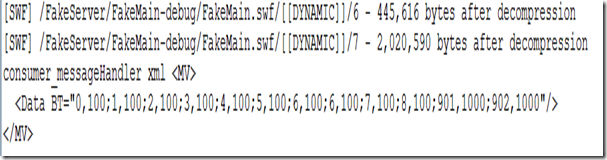
4.Now we can test it,put some xml string in the textarea,and send it.


image


5.We can see the message on the console window


 In server console


image


In flash console


image


Above source file,please link to this link to download source

2011年9月20日 星期二

作品 - 台灣當日黃金報價(powered by adobe air for mobile)

image

Adobe air on mobile 也出來一陣了

由於每天都有在看黃金行情的習慣,android 上沒有自己覺得合適用的app

於是自己來寫一個試試,順便來練習一下Flex for mibile的開發

目前,並沒有使用到mobile上的feature,只算是基本的認識一下flex for mobile的架構

在寫的過程只有一個感覺,可能是flex的基本原件在mobile上會有效能的影響

(應該蠻有影響的,我使用了DropDownList在device上居然點不到 )

在我使用的版本 4.5.1裡,有非常多的元件沒有,或是找不到,這確實讓一些可想得到的功能

可能需要想一些代替方案,或是需要直接用actionscript自己寫一個元件

好吧,總之先上架分享給anroid 手機可以下載air的朋友吧

這個版本 0.0.1,只能查詢當日有更新行情的資料(有開市),假日點開就看不到行情囉?! 哈

之後再來加強其它想到的功能,有下載的朋友幫忙給的評價囉(不論是好或壞,我承認目前真的非常的陽春)

下載連結如下:https://market.android.com/details?id=air.GoldPrice  

(網頁更新會比較慢有可能還是舊的,由手機直接找的話,會比較快看到新的訊息)


updated 2011/09/21---0.0.4---- 增加美金、台幣選擇及日期往前推、往後推功能(flex mobile 沒有日期元件,先用這個替代),以下為這個版次的預圖

p01p02p03p04

updated 2011/09/25---0.0.7---

         a.加入日報表線圖
         b.加入月報表及線圖
         c.調整選擇功能
         d.日報表及月報表若是無資料自動往前最後一個日(月)有資料日期或月份

p01p02p03p05

2011年6月2日 星期四

stateGroups 簡易範例

<?xml version="1.0" encoding="utf-8"?>
<s:Application xmlns:fx="http://ns.adobe.com/mxml/2009"
xmlns:s="library://ns.adobe.com/flex/spark"
xmlns:mx="library://ns.adobe.com/flex/mx"
minWidth="955"
minHeight="600">

<fx:Script>
<![CDATA[
protected function button1_clickHandler(event:MouseEvent):void
{
this.currentState='one';
}

protected function button2_clickHandler(event:MouseEvent):void
{
this.currentState='two';
}

protected function button3_clickHandler(event:MouseEvent):void
{
this.currentState='three';
}
]]>
</fx:Script>

<s:states>
<s:State name="one"
stateGroups="o"/>
<s:State name="two"
stateGroups="t"/>
<s:State name="three"
stateGroups="o,t"/>
</s:states>
<fx:Declarations>
<!-- Place non-visual elements (e.g., services, value objects) here -->
</fx:Declarations>
<s:Button x="32"
y="346"
label="Button"
click="button1_clickHandler(event)"/>
<s:Button x="106"
y="346"
label="Button"
click="button2_clickHandler(event)"/>
<s:Button x="184"
y="346"
label="Button"
click="button3_clickHandler(event)"/>
<s:BorderContainer includeIn="o"
x="32"
y="32"
width="200"
height="200"
backgroundColor="#F01010">
</s:BorderContainer>
<s:BorderContainer includeIn="t"
x="263"
y="32"
width="200"
height="200"
backgroundColor="#420BF5">
</s:BorderContainer>
</s:Application>


2011年2月14日 星期一

Flex i18n

不小心被我誤刪了
有機會再來補

2010年8月26日 星期四

Location of flashlog.txt

The output of trace statements is logged to flashlog.txt in the debug version of Flash
Following is the location of flash player log file (flashlog.txt) on various operating systems.

  • Windows Vista : C:\Users\{user-name}\AppData\Roaming\Macromedia\Flash Player\Logs
  • Windows XP : C:\Documents and Settings\{user-name}\Application Data\Macromedia\Flash Player\Logs
  • Linux : /home/{user-name}/.macromedia/Flash_Player/Logs/
  • Mac : /Users/{user-name}/Library/Preferences/Macromedia/Flash Player/Logs/

2010年6月9日 星期三

Flex Load Image with ProgressBar


import mx.collections.ArrayCollection;
[Bindable]
private var datas:ArrayCollection= new ArrayCollection([{label:'Flex',data:'http://mixmatters.com/hot/2008/images/DJ_Flex-Te_Quiero.jpg'},
{label:'Apple',data:'http://www.teksource.com.tw/Quotation_TEK/images/product/APPLE.jpg'},
{label:'Google',data:'http://140.136.240.106/98/images/google_logo.jpg'},
{label:'Nokia',data:'http://www.blogcdn.com/www.engadgetmobile.com/media/2008/11/nokia-crystal-ball.jpg'}]);
]]>

source="http://mixmatters.com/hot/2008/images/DJ_Flex-Te_Quiero.jpg"
x="{this.list.x + this.list.width}"
y="10"
horizontalAlign="center"
open="progressBar.visible = true"
complete="progressBar.visible = false"
completeEffect="Fade"/>
x="{this.list.x + this.list.width}"
y="10"
source="{image}"
visible="false"
showEffect="Fade"
hideEffect="Fade"/>


image.source = list.selectedItem.data;
]]>


Flex - Slide Menu


layout="absolute"
height="100%" width="100%">


toState="over1">
target="{this.c1}"
duration="2000"/>

toState="over2">
target="{this.c2}"
duration="2000"/>

toState="over3">
target="{this.c3}"
duration="2000"/>

toState="over4">
target="{this.c4}"
duration="2000"/>

toState="over1-1">
target="{this.c1}"
duration="1000"/>

toState="over2-2">
target="{this.c2}"
duration="1000"/>

toState="over3-3">
target="{this.c3}"
duration="1000"/>

toState="over4-4">
target="{this.c4}"
duration="1000"/>


x="{this.canvas1.x}"
y="{this.canvas1.y}"
width="200"
height="55">


y="23"
width="200"
height="55"
id="canvas1"
mouseOut="this.currentState='over1-1'"
mouseOver="this.currentState = 'over1'">


x="{this.canvas2.x}"
y="{this.canvas2.y}"
width="200"
height="55">


y="96"
width="200"
height="55"
id="canvas2"
mouseOut="this.currentState='over2-2'"
mouseOver="this.currentState = 'over2'">


x="{this.canvas3.x}"
y="{this.canvas3.y}"
width="200"
height="55">


y="168"
width="200"
height="55"
id="canvas3"
mouseOut="this.currentState='over3-3'"
mouseOver="this.currentState = 'over3'">


x="{this.canvas4.x}"
y="{this.canvas4.y}"
width="200"
height="55">


y="242"
width="200"
height="55"
id="canvas4"
mouseOut="this.currentState='over4-4'"
mouseOver="this.currentState = 'over4'">


2010年4月6日 星期二

Flex3 搭配amfphp


2009年5月17日 星期日

使用Flex Code Generator開發Flex+PHP

為加速開發Flex+PHP,於是使用了
FCG : a Flex Code Generator
  • 過往在Java的經驗,寫ORM的model及DAO是最沒價值又費時間的,所以會較依賴generator
  • 此程式在產生對應java的as model時,會有型態無法直接轉換的問題 e.g.java中 BigDecimal 轉到as仍是BigDecimal但as裡沒有BigDecimal型態,不過己可減少蠻多這種重覆又沒義意的工作了
建立過程會分二個階段,我們先來介紹過PHP的部份
  1. 首先直接在該網站使用線上安裝(會直接偵測是否有安裝AIR)
  2. 裝好後先在MySQL建立好了幾張table,再將script export出來
  3. 啟動FCG後在【Main Package Name】輸入自己的full package name <= 這個階段可暫不輸入
  4. 接著選擇【Project Type】 選擇【PHP】 => 【Start Project】
  5. 【Import SQL】 選擇己export出來的table script <= 只可包含Create Table的script
  6. Finish後即可出現即可出現所有的VO及DAO PHP程式
  7. 內容中有一個header.php ,請自行建立所需資料庫相關資訊
待續.......

2009年1月4日 星期日

iCal4j 簡單範例 + Flex Calendar

最近有需要幫 使用者做一工作排程程式
找了一下資源
決定使用Flex 開發
Flex己有己前人開發好的 Calendar 元件
http://blog.flexcommunity.net/?p=11
這個版本是採用了 http://www.quietlyscheming.com/blog/components/interactive-calendar/
所做的修改
排程中主要是使用了iCal 的檔案格式來做事件的排定

於是 找了 iCal4J做成產生iCal的底層程式
http://ical4j.sourceforge.net/introduction.html
請下載了相關的jar檔
開始了第一個簡單的範例


我所貼的這段 請注意在 第24行的部份
我在Run時一定要有 Method 這個Properties
官網範例沒加 會一直出現 週期性農曆約會儲存為 iCalendar 格式
這個$M說明 講的不是很清楚的怪說明

接著就就把 產生的 .ics 檔案按下步驟放到
Calendar程式中


1) open app_code.as
2) on line 81 insert the path to your .ics file

由FlexBuilder執行即可看到所建立的事件


中文沒法出現 但Tip可出現中文,還在了解ing..........

2008年12月5日 星期五

ViewStack 結合 effects

如下這段程式即可達到,感覺得挺麻煩的
做法不同於States 搭配
Transitions
再找找有沒有辨法可一次到位?
看來是不能偷懶


2008年10月20日 星期一

Java5 和 Action Script3比較表(Java5 vs Action Script3 Comparison)

以下這些是我節錄自


 這本書裡 Java5跟 Action Script3的比較表,個人認為比較重要的比較,對Java經驗者會很有幫助的


投影片 1
-->投影片 1 -->

2008年9月25日 星期四

Enterprise IDE Plugin for Flex Builder Public Free Beta

[原文出處]http://www.mail-archive.com/flexcoders@yahoogroups.com/msg102327.html

Flex企業級開發Plug-In

The Enterprise IDE Plugin ™ is an architect and developer productivity suite for Adobe(R) Flex (R) Builder ™ 3 designed to simplify and aid the development of Enterprise Flex Applications using Flex Builder 3. The Enterprise IDE Plugin is immediately available in a public, free time-expiring beta release. It includes new tools for code navigation, code generation and code documentation, as well as general tools for increased Flex developer and architect productivity, and provides built-in support for major third party Flex and ActionScript open source frameworks. For more information and installation instructions, please visit http://www.idefactory.com

Enterprise IDE Features: ------------------------

*Code Navigation Tools

- Enterprise IDE Perspective.

- Flex package explorer view.

- Flex hierarchy explorer view.

- Flex code metrics explorer.

- Flex code dependency explorer.

- Cairngorm explorer view.

* Code Generation Tools

- Enhanced AS3, MXML, and Cairngorm wizards.

- FlexUnit test and test suite generators (for project or class).

- AS3 code generation from UML Model

- Cairngorm end-to-end class generators for REST, Web Service (WSDL) and Remoting services.

- Support for multiple Cairngorm versions.

- Generation of getter and setters for existing AS3 variables.

- Java Value Object generation from Cairngorm VOs.

- Generation of interactive Flex Cairngorm service test application and graphical FlexUnit test runner.

* General Tools

- e4x editor and expression builder.

- AS3 and MXML code formatters (for project or source file).

- Customizable with Eclipse Enterprise Preference page.

- AS3 and MXML source code TODO and FIXME tasks.

- Help integrated with Eclipse Help System.

- Flex RSS Feed Reader

* Code Documentation Tools

- UML Model generation from Flex project AS3 classes.

- Single click ASDoc documentation generation.

Luis Lejter IDE Factory ™ L.L.C. http://www.idefactory.com "The Source for Enterprise Flex Development Tools"

2008年9月20日 星期六

See flash10,flex4,AIR1.5,Fxg,Thermo,Degrafa

I usually avoid any online video presentations that last longer than 15 minutes (my attention span limit), but in this case, I made an exception. This one hour and ten minute video is loaded with some VERY good content including information and demos of Flash 10, Flex 4, AIR 1.5, FXG / MXMLG, Thermo and the announcement of the collaboration of Degrafa and Adobe.

The video is the keynote from last week’s 360Flex event by Mark Anders, Adobe’s senior principal scientist.

So, gather your kids, make some popcorn, sit back and enjoy. You will also find this and other 360Flex sessions on Adobe Media Player:

If you feel the player screen too small,maybe you can link below link

http://link.brightcove.com/services/player/bcpid1596744118?bctid=1741161343

2008年9月18日 星期四

BlazeDS Introduction in remote object of FLEX3 (用英文打了一篇,文法或字有打錯請指教)

For flex,we should retrieve data from the dababase,but in flex framework.It has no function to retrieve directly.We should use some kind of component to achieve that.Because my familiar computer language is java,so I will introduce java data comunication for retrieve data.Here we use BlazeDS.BlazeDS is a j2ee liberary for how to convert the Java data(or said Java Object) to AMF.

And BlazeDS is the only function that I only know how to retrieve the data from java.Next I will introduce how We need to add to the j2ee server to enable the BlazeDS work.First we should download BlazeDS archive,the link is here ,when we have downloaded the file ,please upzip it,we will get two file,one is a .html file,the other is a .war.We all knew that a .war is compression file so we can upzip the war file,then we can see the web application structure.So the need is the three things(1.web.xml2.flex folder 3.lib folder).


We can see a fragement in the web.xml


The BlazeDS must reading the services-config.xml
So we go to the services-config.xml then we can see the below fragement


Because we use RemoteObject component,so we look the remoting-config.xml


Then we should add the tag destination after default-channels

In the destination tag,we must define id ,and name the id attribute,then put the child node properties and its child node source.In the source node,we will put our java class with its package name.


Below is the java method


Below is its method named sendMail,then we can use RemoteObject to call sendMail method of java side.


and use the RemoteObject(flex) instance to call java method(sendMail)


So our RemoteObject(flex) can call the java method successfully.