2017年3月25日 星期六

【Spring Boot】Why using spring boot

When I need to produce restful api using spring framework,I use Spring MVC4 ,that I need to config spring structure as below

We saw in project have some config file(xml),in spring xml config file was common usage for spring developer,everything look like well.
But in spring boot ,we don’t need config file anymore,and we don’t need to deploy web app to container.

Lets take a look what the spring boot project structure
Yes,no any config file,and no web.xml,amazing!

When we try to add to tomcat to test out project,ide can not let us add boot app to server

So how can we test out app?
Let's take a look on below file

DomoApplication.java


Lets run it as boot app


We can see this app running on 8080 port
Lets try it on browser,look like it running,but content a bit odd,actually we need to add something
We add some content in DomoApplication.java,and run it again
Looks good now


Spring boot let us drop config files,spring developer all know if our project became big or huge ,we always miss in config files so pain,spring boot let us more config again.

So here we got 2 nice feature
  1. No config anymore
  2. No need to install container before deploy to production server
Great~~~

In next post ,I will write more about why I like to use spring boot for my further java web development.see you~~


2016年4月20日 星期三

Building Flex app using gradlefx(some issue record)

In Android development,now I used Android Studio for my IDE,so using gradle for building android must using gradle script.

In my another programing skill Flex,Most of programmers use ant for building script.Now I have a modern choice: gradlefx.

Below record is for what I encounter some issue:

1.Ambiguous method overloading for method java.io.File#. error

So I get starling sample code from starling website.In starling sample,they use gradefx for building process.So  when enter "gradle" command in the sample folder.

G:\starling-2.0\samples>gradle
Parallel execution is an incubating feature.
Defining custom 'build' task when using the standard Gradle lifecycle plugins ha
s been deprecated and is scheduled to be removed in Gradle 3.0

FAILURE: Build failed with an exception.

* What went wrong:
A problem occurred configuring project ':demo_mobile'.
> Ambiguous method overloading for method java.io.File#.
Cannot resolve which method to invoke for [null] due to overlapping prototypes b
etween:
        [class java.lang.String]
        [class java.net.URI]

* Try:
Run with --stacktrace option to get the stack trace. Run with --info or --debug
option to get more log output.

BUILD FAILED

Total time: 35.549 secs

This issue is cause of FLEX_HOME did not define.
When I define FLEX_HOME in system environment,the error won't happen again.

2015年10月4日 星期日

【Android】Android Studio Support JNI(NDK)

I google ndk + android studio,and  get lots of infomation about how progragming ndk with android studio

Lots of tutorial said that need to put Android.mk and Appliction.mk in jni folder

Now I used Android Stuiod 1.4,and get an excited usage,we don’t need to put above files(Android.mk and Appliction.mk ),just follow below steps ,Android Studio can start programing ndk

1.Download NDK

   First you need to download NDK https://developer.android.com/ndk/downloads/index.html

   (I suppose you’ve installed Android Studio)

2.Define NDK loction

             File => Project Structure => Android NDK location:

             Select where your ndk located

            image


       3.Define jni module name

         add below code in defaultConfit of module build.gradle

ndk{
moduleName "leonjni"
}
image 
4.Add jni folder
image 
5.Add load library ,add native method,call native method
image 
6.Generate jni code from native method(alt+enter)
image 
7.Change some text in jni file(c file)
image 
8.Run the app,text in jni file had worked.Have fun.
image 


2015年5月21日 星期四

【Egret Engine】自適銀幕大小做法

修改launcher/egret_loader.js

   1: egret.StageDelegate.getInstance().setDesignSize(document.body.clientWidth, Math.max(document.body.clientHeight,window.innerHeight));
   2: context.stage = new egret.Stage();
   3: var scaleMode =  egret.MainContext.deviceType == egret.MainContext.DEVICE_MOBILE ? egret.StageScaleMode.SHOW_ALL : egret.StageScaleMode.NO_SCALE;
   4: context.stage.scaleMode = scaleMode;

【Egret Engine】整合PureMVC

Egret 可以在專案中結合各式各樣的第三方javascript lib,目前先介紹對該lib有提供TSD的部份

PureMVC 算是Flash Developer都還蠻熟悉的一個MVC Framework

官方文件也有做了一個教學,如何使用第三方javascript lib,基於按照官方的教學,讓我摸索了一段時間,我這邊做個步驟整理以便以後若遇到問題時,可再次按圖操作

這個記錄我使用EgretVS新建出來的GUI專案來說明

2015-05-21_162536

新增專案完成後,在專案目前增加如下檔案

2015-05-21_164548

puremvc的TSD及JS檔案請至 github 下載

puremvc.json這個檔案,請自行增加,內容如下,source節點請依個人喜好填入

   1: {
   2:     "name": "puremvc",
   3:     "source":"src/puremvc/",
   4:     "file_list": [
   5:         "puremvc-typescript-standard-1.0.js",
   6:         "puremvc-typescript-standard-1.0.d.ts"
   7:     ]
   8: }

接著要修改egretProperties.json,把puremvc這個新增的module加入


2015-05-21_165203


完成後執行一下build engine


2015-05-21_165527


build完後,在libs目錄下即會出現 puremvc的參照


2015-05-21_165659


在src下新增一個Facade


2015-05-21_170426


程式如下:


   1: module leon456 {
   2:     export class ApplicationFacade extends puremvc.Facade implements puremvc.IFacade {
   3:         public constructor() {
   4:             super();
   5:             console.log('ApplicationFacade');
   6:         }
   7:  
   8:  
   9:         public static getInstance(): ApplicationFacade {
  10:             if (this.instance == null) this.instance = new ApplicationFacade();
  11:             return <ApplicationFacade><any> (this.instance);
  12:         }
  13:     }
  14: } 

並在 Main.ts最下方增一行,叫一下Facade初始化(singleton)


2015-05-21_170719


再執行一下build engine,及build


2015-05-21_170835


執行一下程式  Ctrl+F5


若未發現任何報錯,即己加載PureMVC至Egret專案成功


2015-05-21_171100


其它關於PureMVC該如何拼湊結構,可參考 github上 2048Egret 這個專案來學習,接下來只記錄在使用PureMVC時在typescript會發生的一些注意事項及跟使用actionscript3版本時不太一樣的地方


  • 需要經檔案執行egret build跟egret build engine,每次新增完class,需要去執行這二個動作,執行完後會去修改bin-debug/game_file_list.js這樣在執行程式時才會找到的參照
  • 在Mediator中,慣例會增加一個取得對應view的function 如下 ,需要在function前加上 get關鍵字,這樣才可以取得該view的參照

       1: module live {
       2:     export class BettingAreaMediator extends puremvc.Mediator implements puremvc.IMediator{
       3:         public static NAME: string = "BettingAreaMediator";
       4:         public constructor(viewComponent: any) {
       5:             super(BettingAreaMediator.NAME, viewComponent);
       6:             console.log("BettingAreaMediator", "constructor");
       7:  
       8:             console.log("BettingAreaMediator", "bankerBetButton = ", this.view);
       9: 
      10: 
      11:             this.view.bankerBetButton.addEventListener(egret.TouchEvent.TOUCH_TAP, this.addBet, this.view);
      12:             this.view.playerBetButton.addEventListener(egret.TouchEvent.TOUCH_TAP, this.addBet, this.view);
      13:         }
      14:  
      15:  
      16:         public listNotificationInterests(): Array<;any> {
      17:             return [];
      18:         }
      19:  
      20:         public handleNotification(notification: puremvc.INotification): void {
      21:         }
      22:  
      23:         public get view(): live.BettingArea {   //前面要加 get 關鍵字
      24:             return <live.BettingArea><any> (this.viewComponent);
      25:         }
      26:  
      27:         private addBet(e: egret.TouchEvent): void {
      28:             console.log("BettingAreaMediator","addBet");
      29:         }
      30:  
      31:        
      32:         private clearBet(e: egret.TouchEvent): void {
      33:         }
      34:  
      35:         private confirmBet(e: egret.TouchEvent): void {
      36:         }
      37:     }
      38: } 


    目前先這樣,後續有發現需要注意處,請做增加

2015年5月13日 星期三

【Ruby on Rails】has_many model using jbuilder

Two model as below

image

group.rb

   1: class Group < ActiveRecord::Base
   2:   has_many :posts
   3:   validates :title,:presence => true
   4: end


post.rb


   1: class Post < ActiveRecord::Base
   2:   belongs_to :group
   3: end

In view/group/index.json.jbuilder


   1: json.groups (@groups) do |group|
   2:   json.extract! group, :id, :title, :description
   3:   json.posts (group.posts) do |post|
   4:    json.extract! post, :id,:comtent
   5:   end
   6: end

So input url on browser,we will get


   1: {
   2:    "groups":[
   3:       {
   4:          "id":1,
   5:          "title":"First",
   6:          "description":"Testtest",
   7:          "posts":[
   8:             {
   9:                "id":1,
  10:                "comtent":"good"
  11:             },
  12:             {
  13:                "id":2,
  14:                "comtent":"test2"
  15:             },
  16:             {
  17:                "id":3,
  18:                "comtent":"test4"
  19:             }
  20:          ]
  21:       }
  22:    ]
  23: }

【Egret引擎】Adobe Flash/Flex 技術無痛移轉至 Html5 遊戲開發(App開發)

上週聽到了可以把Flash直接轉至html5的名詞時,眼睛一亮

聽到了一個新的名詞 Egret ,搜尋了一下

當下以為可以把原本用Flash/Flex開發的應用,直接轉到html5,不需經過再次開發

也就是今天要介紹的開發工具 Egret Engine

官方網址如下:

http://www.egret.com/   =>  英文版的官網,學習資源比較少

http://www.egret-labs.org/ => 中文版本的官網,學習及說明資源較齊全

http://bbs.egret-labs.org/portal.php  => 討論區,上面有一群中國在Flash的專家們寫了很多的教學跟範例


不過當研究了一段時間後,發現要做到完全不用寫程移轉似乎是不太容易的
在官方的說明即己經提到

http://docs.egret-labs.org/faq.html   節錄如下

10. AS3-TS Conversion Tool 是否意味着 Flash游戏能通过工具转换直接移植成 Egret游戏?


答案是否定的。这个工具不是编译器,只是做简单的语法转换,并不保证转换后的代码100%能运行。因为语言特性和底层API限制,Egret无法做 到跟Flash 100%兼容。所以开发者仍然需要学习Egret和TypeScript语法,尤其要注意跟Flash/AS3不兼容的地方。提供此工具主要是为了:快速 将AS3里可复用的大量类库代码迁移到基于Egret的TypeScript代码。简而言之它是一个解决体力活的工具。将绝大部分有规律的语法转换都自动 完成(例如自动给变量加上this关键字,转换基本数据类型等),剩下很小一部分报错借助IDE提示,手动调整即可。在迁移AS3类库过程中,使用此工具 能节约大量的时间。

雖說如此,在我花了一些時間研究後,發現Egret Engine,在設計概念上,跟原本Flash跟Flex的想法,幾乎是一模一樣,主要原因也是因為Egret Engine的開發者即是原本Flex Framework的開發者。就因如此,對於身為Flex的使用者而言,研究這個技術對於無痛移轉至html5遊戲開發實在有著莫大的振奮感,當然二話不說就是直接下載且深入研究,哈

下載 Egret Engine請至
http://www.egret-labs.org/egretengine
在這頁裡會有每次更新的版本
下載後啟動即會出現

安裝好後


由於Egret Engine的安裝工具是使用Adobe Air開發,在下次啟動時可經由Air Update機制提醒有更新,所以把【檢查社區體驗版更新】打開即不用再按一下【檢查更新


在安裝工具的【工具】選單中,提供了多樣的開發工具,建議可以全部都安裝,這些工具在開發的過程都是很有幫助的


其中必要安裝的部份

【EgretVS】  => 這個工具是VisualStudio的插件,主要是協助在寫TS程式碼時可以介由這個工具,建立新的專案,編譯專案,使用IDE協助提示等功能,雖說官網也有提IDE可使用WebStorm,Sublime,不過個人較懶,若非使用VisualStudio,我想應該需要配置一下的
(另外其中有一個功能,想要轉換ActionScript3=>TypeScript的檔案拖拉進專案目錄,就會直接轉換成TypeScript,這個是在文件沒提到的功能,跟【TS Conversion】一樣,不過我認這樣會更方便)


若是使用MAC可使用Visual Studio Code,在專案下增加一個檔案 tsconfig.json後,再專案執行
egret build

即可讓Visual Studio Code,增加代碼提示功能
tsconfig.ts內容如下:
{
    "compilerOptions": {
        "module": "commonjs",
        "noImplicitAny": true,
        "removeComments": true,
        "preserveConstEnums": true,
        "sourceMap": true,
        "target": "ES5"
    }

}


【Res Depot】=>  由於在 Egret Engine是使用了 RES 來去管理所有的圖片(png)及聲音(mp3)的檔案,在剛啟動程式時會透過json(預設是resource.json,可修改成其它檔名)去把所有的資源載入進來,而這份json檔案若是完全手動編寫一定一件很辛若的事,使用這個工具可以加速編寫這個檔案

另外,若是有的圖需要做延展(9-slice/9-patch)的也可透過這個工具做設定

9-slice:http://help.adobe.com/en_US/as3/dev/WS5b3ccc516d4fbf351e63e3d118a9b8e309-7fdd.html

9-patch:http://developer.android.com/tools/help/draw9patch.html


Egret Wing】=> 在遊戲中有時會需要使用到UI系統(app肯定更需要),Egret Engine使用了與Adobe Flex4相同的作業模式(e.g. mxml skin  state),對於原本Egret Engine所提供的ui己不夠使用,或者需執行貼皮的工作時,這時使用這個工具,即可逹到如同Flex4一樣的開發流程


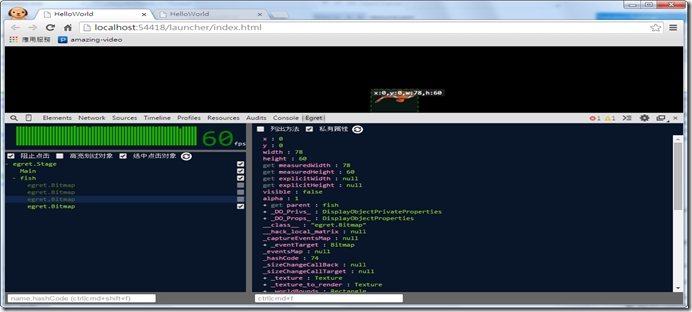
Egret Inspector】=> 性能調校功具,下載後會有一個EgretInspector-v1.5.0.crx,這是一個 chrome的插件,至於怎麼安裝,請google一下吧,或在Chrome開啟這個連結Egret Inspector - Chrome Web Store,裝好後在Chrome按F12即可看到如下圖的調校工具,可觀容畫面上物件的各屬性方法。
使用Chrome 32bit 版本 38.0.2125.111 m看的視圖

image


其它的工具,目前用了一下,大概還沒想到若應用在自己實務上會如何使用,並未深入使用,就先不介紹
  1. 若想了解可以至以下連結了解

  2. TS Conversion    AS3 = > TS
  3. Texture Merger   比Texture Packer更好用的功具
  4. Egret Feather      Particle Editor
  5. DragonBones      Bone Editor

在【資源】選單裡提供了相關的連結


幾個由 Egret Engine寫出來的教學及Demo

微軟虛擬學院 MVA課程  -  一拍即合:HTML5 应用和游戏开发的新纪元

(從35分開始介紹Egret Engine)
http://channel9.msdn.com/Series/MVA-China/MobileDay20141125A06

2048

Demo: http://xzper.com/project/2048egret/
教學: http://is.gd/jlxjn8

打飛機

Demo:http://www.tech-mx.com/egret/fighter/launcher/
教學:http://bbs.egret-labs.org/thread-256-1-1.html


塔防

Demo:http://xinfangke.github.io/td/index.html
教學:http://bbs.egret-labs.org/forum.php?mod=viewthread&tid=5877&extra=page%3D1


相關的新聞

    1. 獵豹瀏覽器攜手Egret 發力H5移動遊戲   http://is.gd/OCeKHh

    2. HTML5版《愚公移山》月流水破百万  http://www.gamelook.com.cn/?p=210150  => 仿進擊的老鼠 ~貓鼠生存戰~ 的手遊 (http://is.gd/5397P9)

    2015年5月5日 星期二

    【Facebook API】Getting id of comments,retrieve all comments


    Getting id of comments

    http://stackoverflow.com/questions/21014855/getting-id-of-facebook-comments-plugin


    Cut the prefix id,and paste to below url

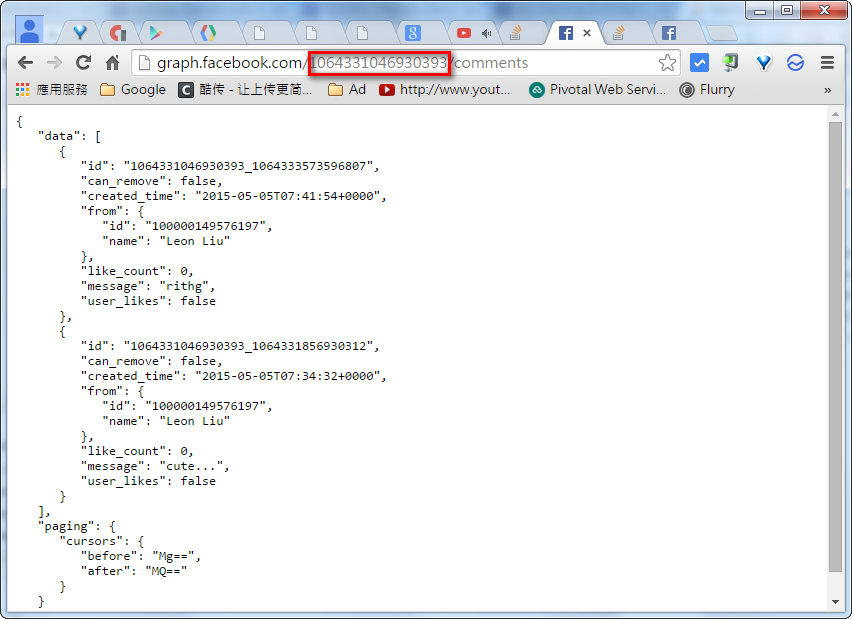
    http://graph.facebook.com/{prefix-id}/comments

    Then we can get all comments as below